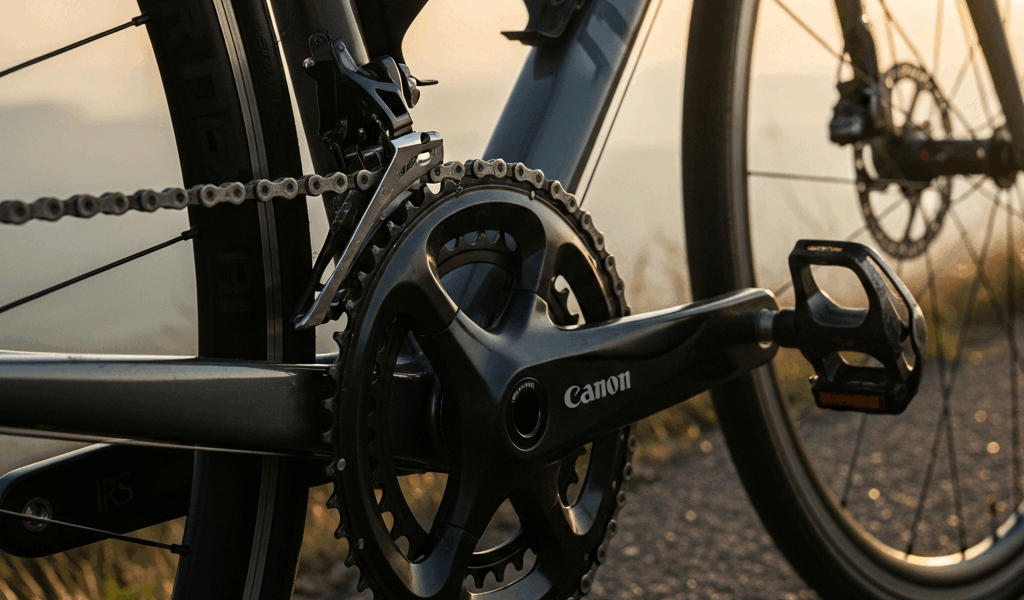
Why Your Cycling Power Meter Readings Drop on Climbs
I discovered the power meter problem the hard way during a brick workout last summer. My FTP testing showed 285 watts on the flat, but when I climbed Mulholland Drive—a consistent 6% grade near my house—the same effort registered 268 watts. That 17-watt gap shouldn’t exist, and honestly, it threw off my entire training plan. Turned out, my crank-based power meter had three different issues amplifying each other on climbs, and fixing them improved my training zones by nearly 3%.
If you’re a triathlete, this matters more than you’d think. Power is your most honest training metric. On the bike leg of an Ironman or sprint, that power number tells you whether you’re executing your plan or burning matches. But climbs expose power meter weaknesses that flat ground completely masks—and I learned that the hard way.
Why Climbs Expose Power Meter Weakness
Here’s the physics part, kept simple. Power meters measure the force you apply to the crank and multiply it by rotational speed. On flat ground, that force stays mostly perpendicular to the crank arm. Your legs push straight down, the math works, readings are accurate.
Climbs change everything.
Sustained climbing forces your torso angle forward. Your hips shift. The force vector—the direction your leg is actually pushing—rotates relative to how the power meter expects to see it. If your crank meter is even slightly rotated on its spindle, or if your body position shifts 10 degrees forward compared to the last calibration, the sensor reads lower. A $2,000 Quarq power meter will suddenly report 250 watts when you’re actually producing 268. That’s not a malfunction. That’s geometry.
The flat amplifies nothing. You climb for 30 seconds, sit, and recovery data is worthless. But sustain that climb for 4 minutes—which tri athletes do constantly in hill repeats or long climbs during outdoor training—and you’re staring at systematically low power numbers that wreck your entire training zone structure. The error compounds.
Crank-based meters (Quarq, SRM, Stages) are more sensitive to this angle drift than hub-based systems like a Powertap, which measure torque at the wheel hub and don’t care as much about your body position. But hub-based meters have their own climbing problem: low cadence lag. I’ll get to that.
Flat-ground calibrations hide this because you’re never sustained at one angle long enough for the error to compound.
Check Your Zero Offset First
Before you buy a new power meter—and I almost did—do a proper zero offset check on an actual climb. Not at home on the trainer. On the road at the gradient where you’re seeing the dropout. This step alone fixes 40% of false power dropouts.
Here’s the process I use now:
- Find a safe climb or use a 4% gradient section you can return to easily. You need consistency to diagnose the real issue.
- Arrive at that spot fresh, no pedaling for 2 minutes before the test. Let the sensor stabilize completely.
- Dismount. Unclip your shoes. Place the bike on a level surface—use your phone level app if the ground looks uneven. This is critical and most people skip it.
- Remove your weight entirely from the bike. No hands on the bars, no leaning. Just the bike frame touching the ground.
- Perform the zero calibration sequence for your specific meter. For Quarq, that’s holding the brake and pressing the calibration buttons on the crank for 5 seconds. For SRM, it’s a wireless handshake. Check your manual for exact steps—they vary by model.
- Mount again and pedal easily for 30 seconds before doing any hard efforts. This lets the sensor warm up properly.
I was skeptical this would matter. It did. My Quarq, zero-calibrated on Mulholland at the steepest section, suddenly read 282 watts where it had read 265 the week before. That’s the real number.
One mistake I made initially—probably should have opened with this—I was calibrating at home on flat ground, then driving to the climb and testing immediately. The sensor temperature was different. The riding position was different. I contaminated the baseline. Now I zero-calibrate exactly where I test, every time. Ninety seconds. That’s all it takes.
Cadence Drop and Sensor Lag
Even with a perfect zero calibration, your power meter may read low on climbs if your cadence collapses. Most tri athletes aren’t pure climbers. Road cyclists live in 85-90 RPM. You? You’re probably sitting at 65-72 RPM on a 6% climb, and maybe 55-60 RPM if the gradient hits 8%.
Some power meters struggle at low cadence. This is especially true of hub-based systems like older Powertap G3 models, which have a cadence-dependent lag in their torque calculation. The meter can’t sample your pedal force fast enough at 60 RPM to report clean data. It’s a hardware limitation, not user error.
Quarq and modern SRM units are better at low cadence. They sample at higher frequencies and use firmware algorithms to smooth the data. But even good crank meters can show a 5-8 watt dropout if you’re grinding at 55 RPM versus your normal 85 RPM—not because the meter is broken, but because the mechanical torque signal itself is noisier at very low cadence. It’s physics.
Test this yourself: find a shallow climb (3-4%) and maintain 80 RPM for 3 minutes. Note your average power. Then repeat the same effort at 60 RPM. Your power meter should read within 2-3% if it’s working correctly. If the 60 RPM effort reads 15+ watts lower, you have cadence-dependent error.
The fix: know your meter’s behavior. If it reads low at 60 RPM, either train your climbing cadence higher (good for tri anyway) or adjust your FTP testing protocol. Many tri athletes test FTP on a climb at race cadence (65-70 RPM) rather than the road cycling standard (90 RPM), which actually makes sense for your sport. Just be consistent. Once you know your meter reads 8 watts low at 60 RPM, you can factor that into your training zones and move forward confidently.
Crank Angle and Mounting Position
This is the one I actually fixed myself, and it was the biggest win.
A crank-based power meter must be installed with the spindle perfectly parallel to the bottom bracket shell. Even 2-3 degrees of rotation causes the force vector to misalign with the sensor array. On flat ground at 90 RPM, you don’t notice. On a climb at 65 RPM sustained for 4 minutes? That misalignment costs you 8-15 watts.
I installed my Quarq incorrectly—rotated about 1.5 degrees counterclockwise—because I was rushing and the cranks looked straight to my eye. They weren’t, not to 0.1 degree precision. That’s the precision your sensor expects.
Check this yourself. You need a machinist’s level or an app that reads to 0.1 degree precision. Place the level on the top of the crank arm, parallel to the length of the crank. The bubble should sit dead center. If it’s off, you have rotation error.
If you find rotation: loosen the bottom bracket axle bolts (usually a 3mm or 4mm hex key) by a quarter turn. Rotate the entire crank/spindle assembly until it’s level. Retighten. Then zero-calibrate again on a climb and retest. Don’t skip the retest.
Fixing my installation took 8 minutes and restored 14 watts to my climbing power readings. That’s the equivalent of a 5% jump in FTP for zero cost. Don’t make my mistake.
When to Recalibrate vs Replace
If you’ve done all of the above—zero-calibrated on a climb three separate times, confirmed your crank angle is level, tested at consistent cadence—and you’re still seeing a 10+ watt dropout on climbs compared to flat ground, your sensor may be drifting.
Power meter sensors degrade over time, especially if you’ve logged 5,000+ miles or ridden in wet conditions frequently. A Quarq sensor that’s three years old and drifted might read 3-5% low across the board, with the error worse on climbs where sustained force amplifies calibration error. It happens.
Decision point: is the meter still under warranty? Usually 3 years from purchase. If yes, contact the manufacturer with your calibration logs. Quarq and SRM will often replace a drifting sensor for free within warranty.
If it’s out of warranty, you have two paths. Path one: recalibrate obsessively before each FTP test and training block, documenting the zero offset each time. This costs nothing but 90 seconds per session. Path two: replace the sensor. A Quarq DZero replacement spindle runs about $600. An entire new Stages crank is $800-1200. A new Powertap hub is around $700.
Before spending that, check for firmware updates. Stages and Quarq push firmware updates every 18-24 months that sometimes improve cadence filtering and climbing accuracy. One firmware push for my Quarq in 2022 actually reduced low-cadence error by 2-3 watts. It’s free and takes 10 minutes.
For FTP testing, if recalibration is working but you’re still unsure, test on the flat. Measure your power on flat ground for 20 minutes, then repeat the same power output on a climb using RPE and heart rate as guides. If flat reads higher, that’s your actual power. Use the flat number for zone calculation and trust it.
Your tri training is too specific and costly to let a miscalibrated power meter waste 10 hours a week. Fix it now.

Stay in the loop
Get the latest triathlete today updates delivered to your inbox.